Admin Guide
The A&A Suit Customization admin panel is accessible from your WordPress Admin under WooCommerce → A&A Suits. It is organised into the following tabs:
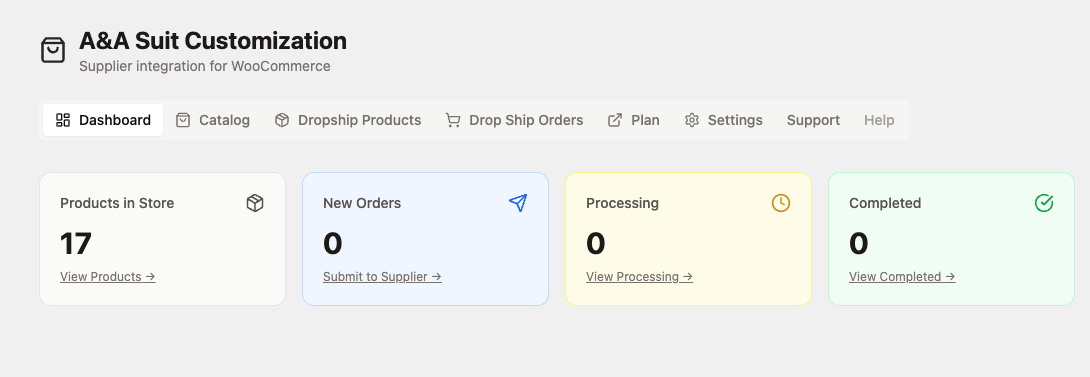
- Dashboard — Overview of store products, pending orders, and license status.
- Catalog (Paid Plan) — Attach the suit customizer to your own WooCommerce products.
- Dropship Products — Browse the A&A supplier catalog and import products to your store.
- Drop Ship Orders — Track and submit drop ship orders to the supplier.
- Plan — View your current plan and upgrade to a paid license.
- Settings — Configure your license key, supplier URL, markup percentage, and portal access.
- Support — Raise a support request directly from the admin.
- Help — Quick start guide and FAQ inside the plugin.
Navigating the Admin
Access the plugin via WooCommerce → A&A Suits in your left navigation panel. The plugin tab bar at the top lets you switch between all sections without leaving the page.
Free Plan restriction: The Catalog tab is only available on a paid plan. Import and manage up to 10 drop ship products on the free tier. Upgrade to unlock all features.
Section Guides
- Dashboard — Order statistics and license activation.
- Dropship Products — Import and manage supplier products.
- Catalog (Paid) — Enable the suit customizer on your store's own products.
- Settings — All configuration options.